
BBQ & smoking log for backyard pitmasters
Log every cook.
Cook the next one better.
BBQuill records everything that happens on the pit — grate temps, probe temps, wraps, spritzes, fuel adds. One cook can span every cooker you own — smoker, grill, griddle — each on its own timeline. Give a cook a serve time and it back-schedules everything you’ve timed so it all lands together.
Public web beta. Free plan, no credit card. Enter temperature readings manually.
- check tenderness before pulling
- 203°check tenderness before pulling
- of brisket, logged minute by minute
- 12hof brisket, logged minute by minute
- cooker types, from offset to air fryer
- 15cooker types, from offset to air fryer
What it does
A log that plans the next cook
Multi-cooker by design
Brisket on the offset, beans on the kettle, corn on the griddle — one cook, several cookers, each on its own timeline, each fully logged: grate temps, probe temps, wraps, spritzes, fuel adds, flips. So you can sit down when the food is ready, not an hour later. Most BBQ journals model one cook on one pit.
Run it back
Save any item as a plan and reuse it next time. Give a cook a serve time and BBQuill back-schedules every item you've timed so it all lands together. No more doing arithmetic in your head at 5am. So the next cook starts from what worked, not a guess.
Probe targets that mean something
Doneness lives on the probe, not on a guess. Set a pull temp, watch the trend, and get told when it's there.
Pitmaster AI
Ask it anything mid-cook. It knows your cookers, your pantry and your recent cooks — and it proposes plans you approve, never applies them. So you have a second pair of eyes that remembers your recent cooks, not just this one.
Works with any thermometer you already own. BBQuill is a log, not a probe — type what it reads and it does the rest. °F or °C.
What it looks like
A cook, as BBQuill records it
An illustration, not a screenshot. The gauges and log rows are the app’s own — the cook is an example.
Saturday brisket
Offset · serve 6:00 PMFire lit
Oak splits, bottom vent half open.
- 265°F grate
Brisket on
14.2 lb packer, fat cap up.
Spritzed
Apple cider vinegar, first of three.
- 158°F
Wrapped
Butcher paper — stall held at 158°F for 90 minutes.
Check the flat for tenderness — temperature alone doesn't settle it. Record when you pull it and how you rest it, then leave a note for the next cook.
Inside the app
Every cook, on the record
From the Android app, using demo cooks.
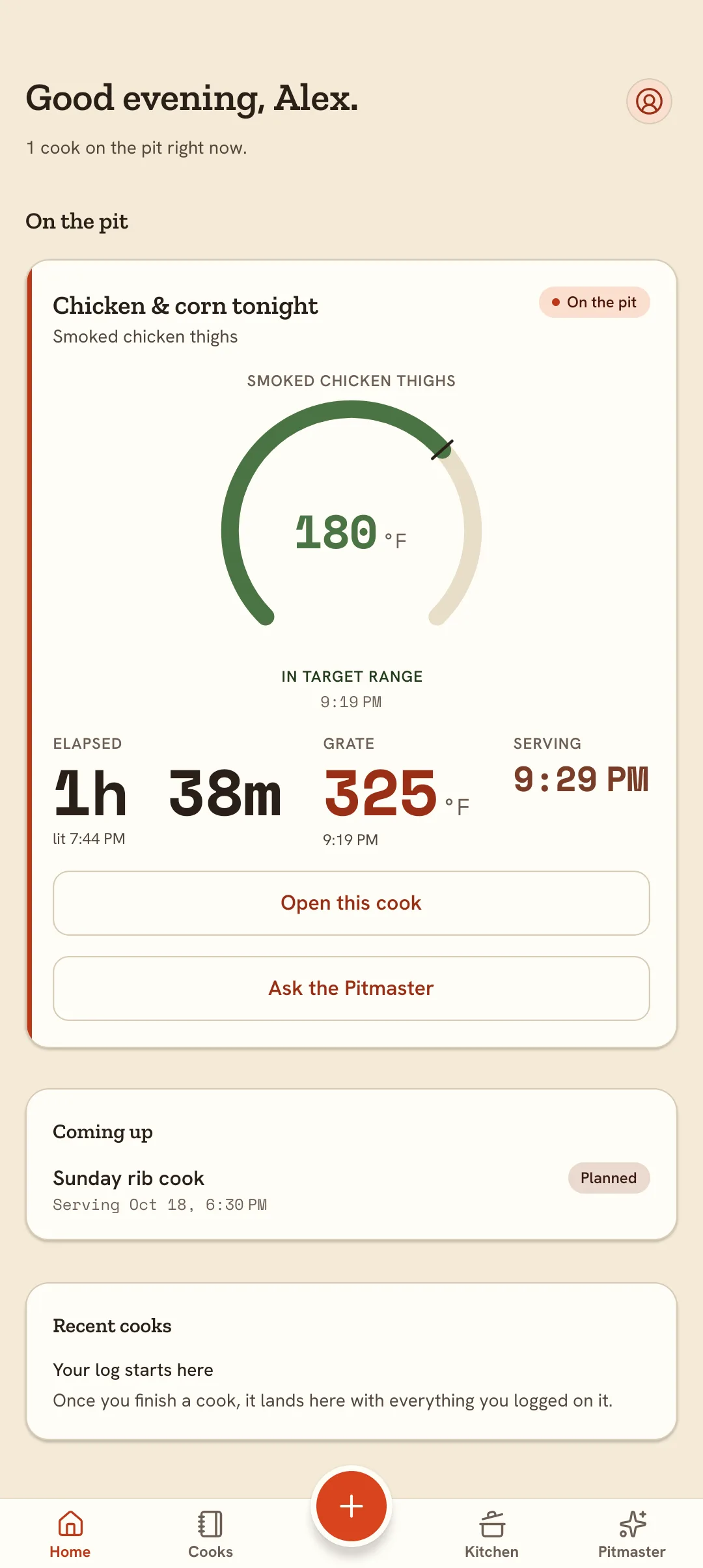
A live cook, with the probe gauge, grate temperature and serving time together. 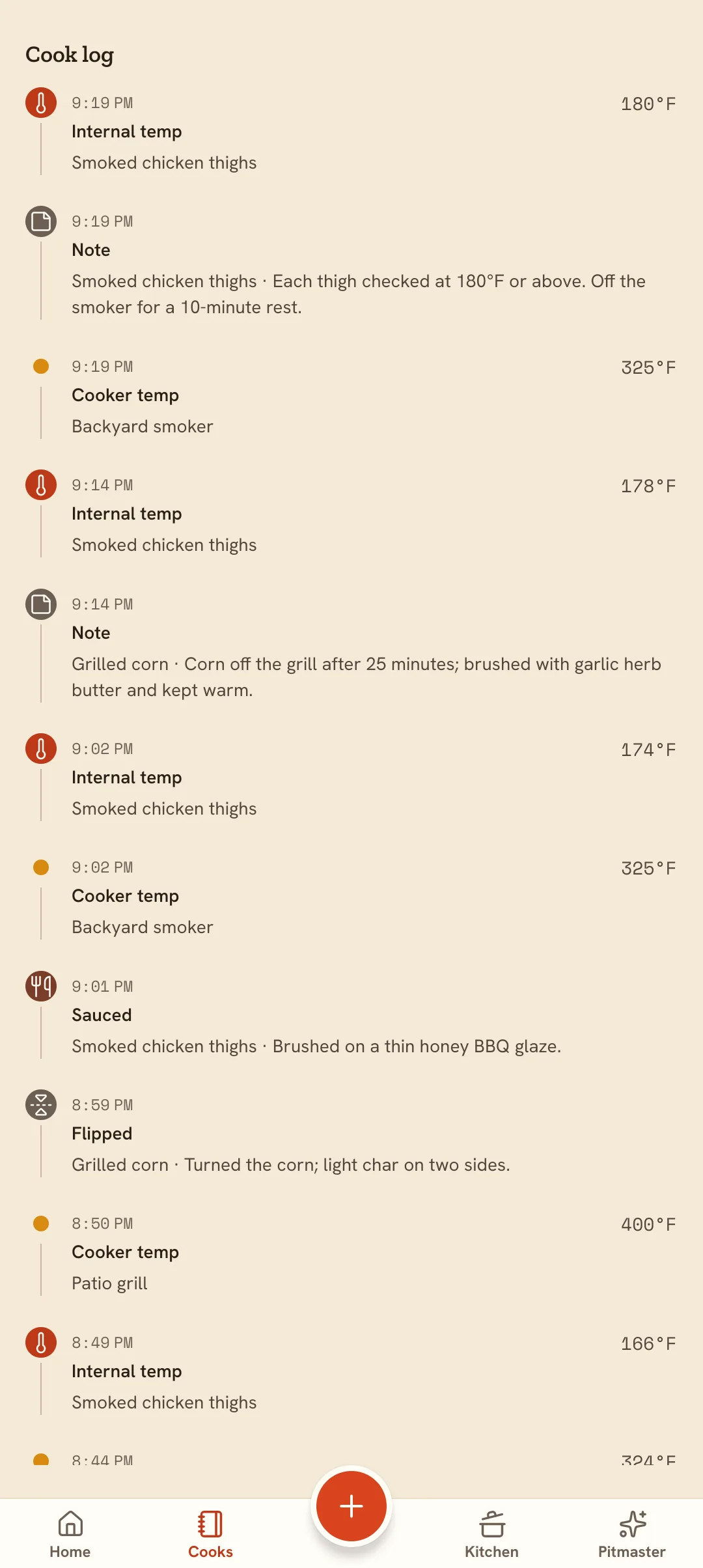
The cook log keeps readings and notes from the smoker and grill in order. 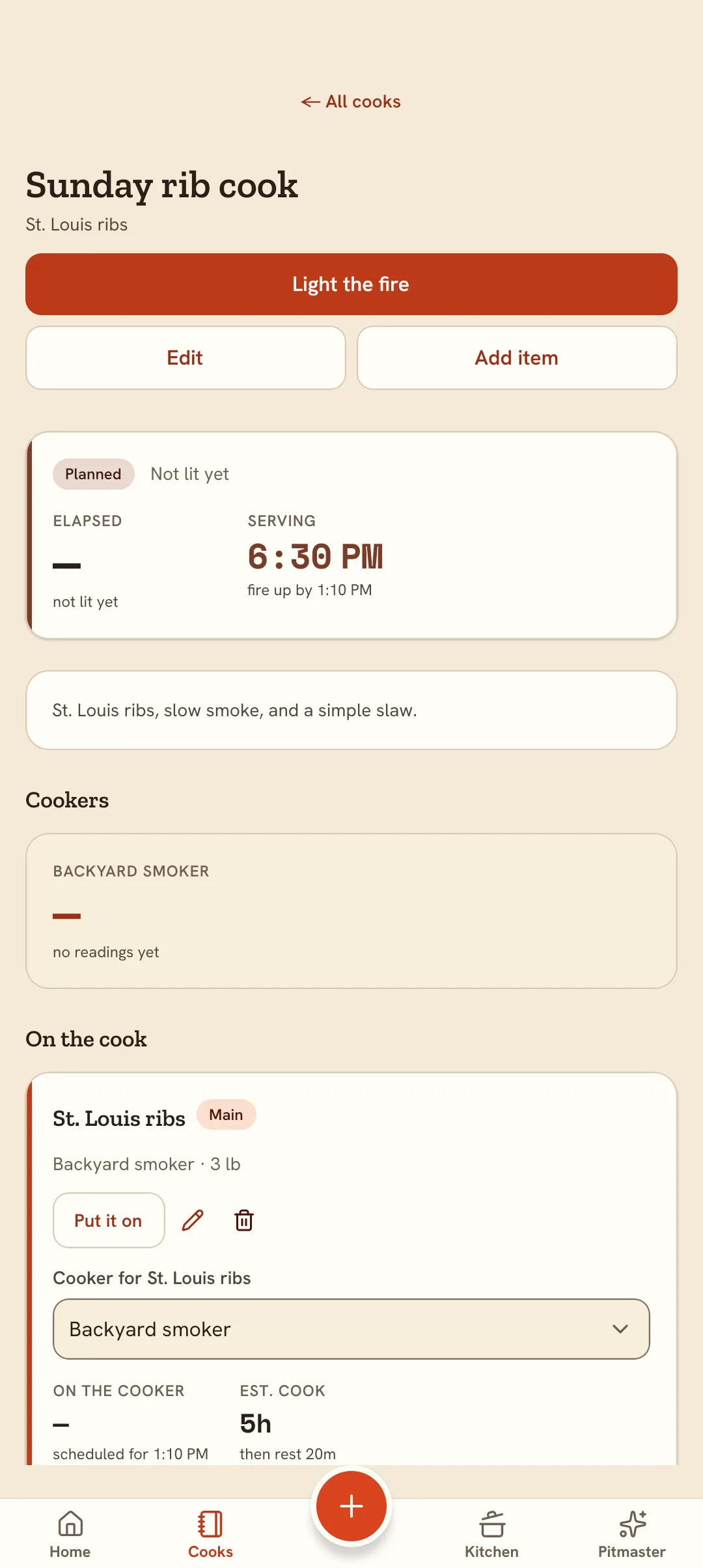
A planned cook, scheduled back from when you want to eat. 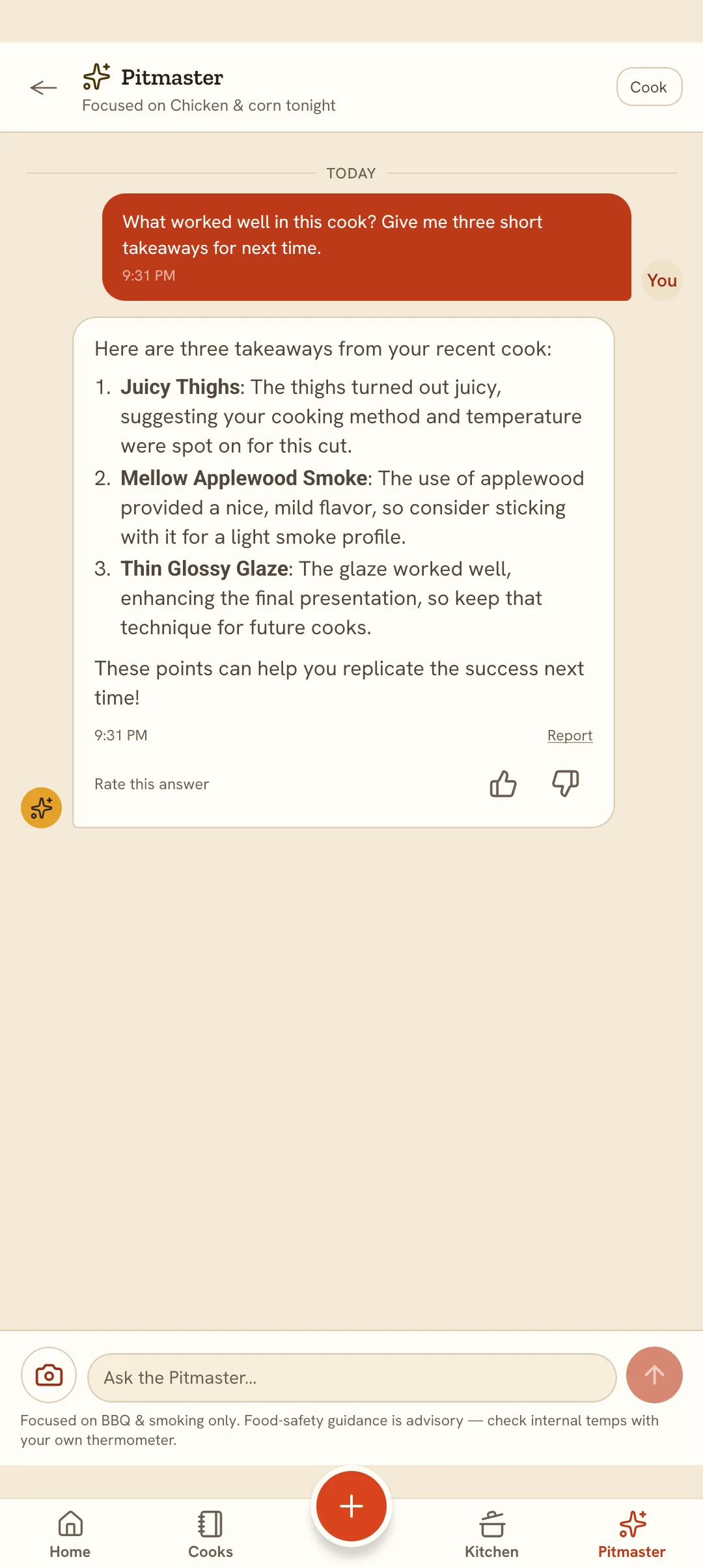
Pitmaster answers a question about the cook in front of it.
How it works
Three steps to your first cook
- 1
Add your cooker
Name what you cook on — offset, pellet, kamado, kettle, griddle. That's the whole setup.
- 2
Start a cook
Add what's going on, your own estimated cooking and rest times, and when you want to eat. BBQuill puts those estimates on a timeline you can adjust as the cook unfolds.
- 3
Log as you go
Temps, wraps, spritzes. It builds the timeline, watches your plan's steps, and files it all to your log.
Pricing
Start free. Upgrade when the cap bites.
Backyard
Core cook logging, up to 2 cookers — free forever.
Free
- 2 cookers
- 3 saved cook plans
- 5 photos per cook
- 20 AI Pitmaster messages a month
Pitmaster
Most cooksUnlimited cookers, cook plans, and photos, plus unlimited AI Pitmaster chat with web search.
$6.99/mo
or $39.99/yr billed yearly — save ~52%- Unlimited cookers
- Unlimited saved cook plans
- Unlimited photos per cook
- Unlimited AI Pitmaster (fair use)
- AI web search + the stronger plan model
- Export to PDF and CSV
- Custom cook rules + live cook commentary
BBQuill is built for the backyard pitmaster who wants a record and a plan. It’s not a competition timer and not a restaurant system — every cook is yours, scoped to one owner, with no teams or shared timelines.
Questions
Frequently asked
Is BBQuill free?
Yes. The Backyard plan lets you log unlimited cooks — grate temps, probe temps, wraps, spritzes, fuel adds — with two cookers, three saved cook plans, and the AI Pitmaster for everyday questions. No credit card required. Pitmaster lifts the caps and adds web search, formatted exports, and custom cook rules and live cook commentary.
Does it work with my smoker?
Yes. BBQuill is cooker-agnostic: offsets, pellet smokers, kamados, kettles, drums, WSMs, gas grills, griddles, ovens, air fryers — you name what you cook on and it keeps that cooker's history. A single cook can span several of them at once.
Do I need a WiFi thermometer?
No. BBQuill is a log, not a probe — you type in what your thermometer reads, and it does the rest: tracks the trend, evaluates your plan's steps, and tells you when something is due. Any thermometer works, including an instant-read.
Can it tell me when to put everything on?
Yes. Give a cook a target serve time and BBQuill works backward from it — an item that cooks four hours and rests one has to go on five hours before you eat — so everything lands together instead of the sides being cold while the brisket rests.
Is the AI advice safe to follow?
The Pitmaster explains its reasoning and always surfaces food safety: the 40–140°F danger zone, and USDA safe internal temperatures with any required rest. It proposes a cook plan and you approve it before anything is saved — nothing is ever applied automatically. Safe minimums are advisory, so you can cook to your own target and be warned rather than blocked.
What happens to my cookers if I downgrade?
Nothing is deleted. If you go back to Backyard with more cookers than it allows, you choose which ones to pause — a paused cooker keeps every cook ever logged on it, and comes back the moment you upgrade again.

From the founder
Kellen Butler
engineer and independent product builder · Built in Oklahoma
When I was a kid and someone asked what I wanted to be when I grew up, I always gave two answers: an inventor and a cook. BBQuill is where those two finally came together.
Every brisket, pork butt, or rack of ribs teaches you something—a grate temp that ran hot, a wrap that came too early, a rest that paid off—but by the next cook, those details are usually scattered across photos and notes or forgotten altogether. I built BBQuill to keep the whole story of a cook in one place: the plan, what actually happened, and what I learned along the way.
Read moreYour next cook deserves a record
Start free, log one cook, and see what it tells you next time.
Start free